
Colors in digital art are described in a number of ways. Different numerical models (”color spaces”) are used for different purposes and some basic knowledge is needed to avoid confusion and errors.
Here is a basic overview of the most popular color models and related terms.
RGB color space
That's how the colors are actually coded.
RGB color space uses amounts of primary Red, Green and Blue to code each color.
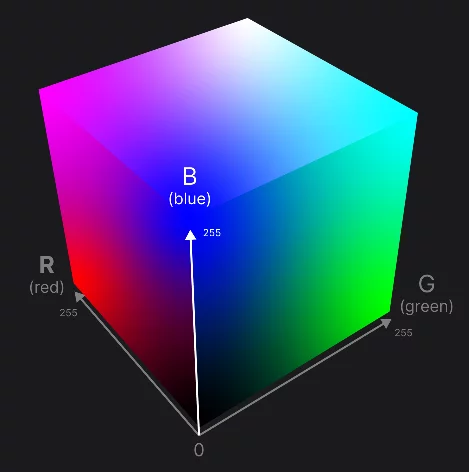

Each color is described by three numbers (each from 0 to 255*)
for example "R92G200B255" describes this shade of pale blue.
You can define any RGB color using the RGB sliders in the color panel (see RGB color sliders).

Learn more about the color panel in Color panel.
RGB color may also be defined in hexadecimal color coding format. Learn more in Hexadecimal color coding.
Using 24-bit RGB coding it is possible to define 16,777,216 distinct colors. (Practically, computer devices usually cannot display all the possible colors. See Color gamuts to learn more about the gamutsGamutColor gamut is a set of colors that can be accurately represented in given color space or on given device. Gamuts describe limitation of different color representations..)
Even if RGB color coding is used internally by all graphics applications it is unintuitive for humans and inconvenient for use. For this reason, alternative color coding systems are used in color pickers (learn more about color picking tools in Color panel).
HSB color space
Hue-Saturation-Brightness
HSB/HSV* color dimensions
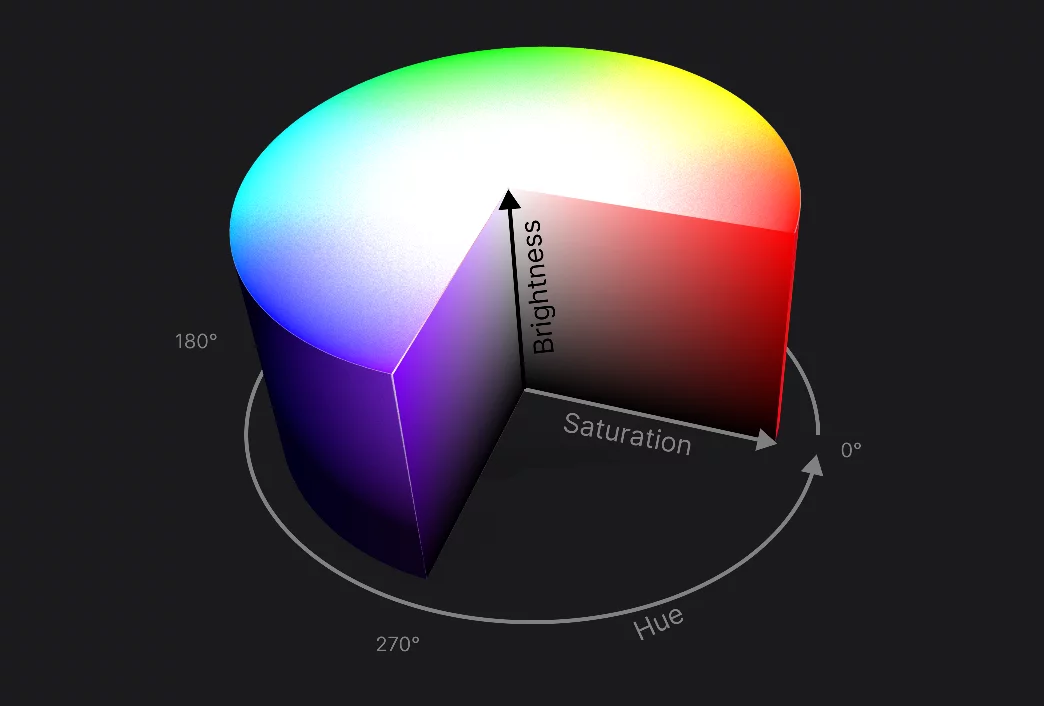

Each color is described by three numbers; for example "H=0°, S=61, B=66" describes this color.
White is at the center of the top surface (any Hue, 0% Saturation, 100% Brightness)
Black is at the center of the bottom surface (any Hue, 0% Saturation, 0% Brightness)
Pure, saturated colors are on the upper rim (100% Saturation, 100% Brightness)
You can define any HSB color numerically using the sliders in the color panel [see Color sliders.]

However, way easier is to use the HSB color wheel ).
HSB color space projects each RGB color onto a three-dimensional cylinder space. Each color is defined here by three values: Hue, Saturation and Brightness. Hue is usually given in degrees (0-359°), Saturation and Brightness in percent (0-100)
HSB is a remapping of full RGB color space, however it can code only 3,600,000 distinct colors.
The HSB color space is often referred to as HSV (Hue-Saturation-Value).
This is mainly to avoid confusion with "RGB" color space by not using "B" in the name.
HSV and HSB are the same model.
Note that HSL (Hue-Saturation-Luminance) model is very different from HSB/HSV.
Lab color space
The scientific approach
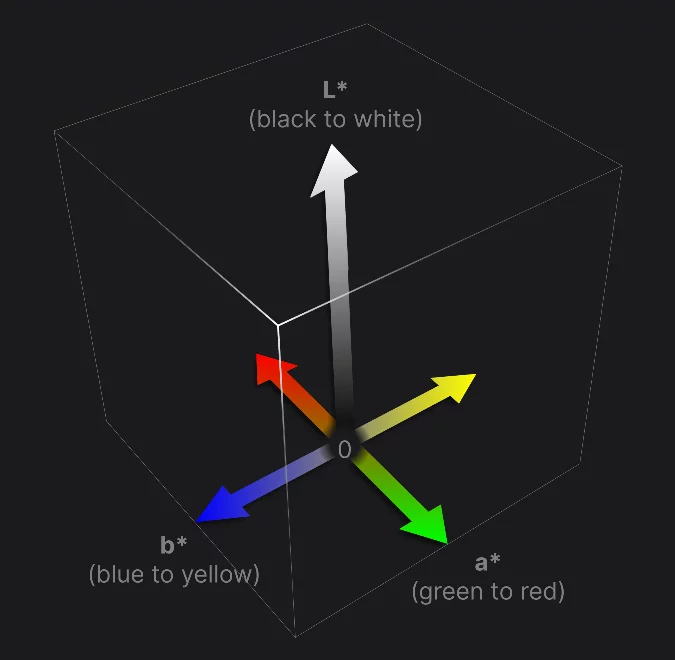
L*a*b* (CIELAB, LAB) color space describes all possible colors in an abstract, three-dimensional space.
Each color is described with three coordinates:
L* = luminance
a* = green-red component
b* = blue-yellow component
Theoretical L*a*b* color space
In actual applications the Lab color space is reduced to available RGB spectrum (see RGB color spaceRGB color spaceAn additive color model defined by mixing three primary colors: Red, Green and Blue.Learn more).
Colors visible for human eye
in the L*a*b* color space
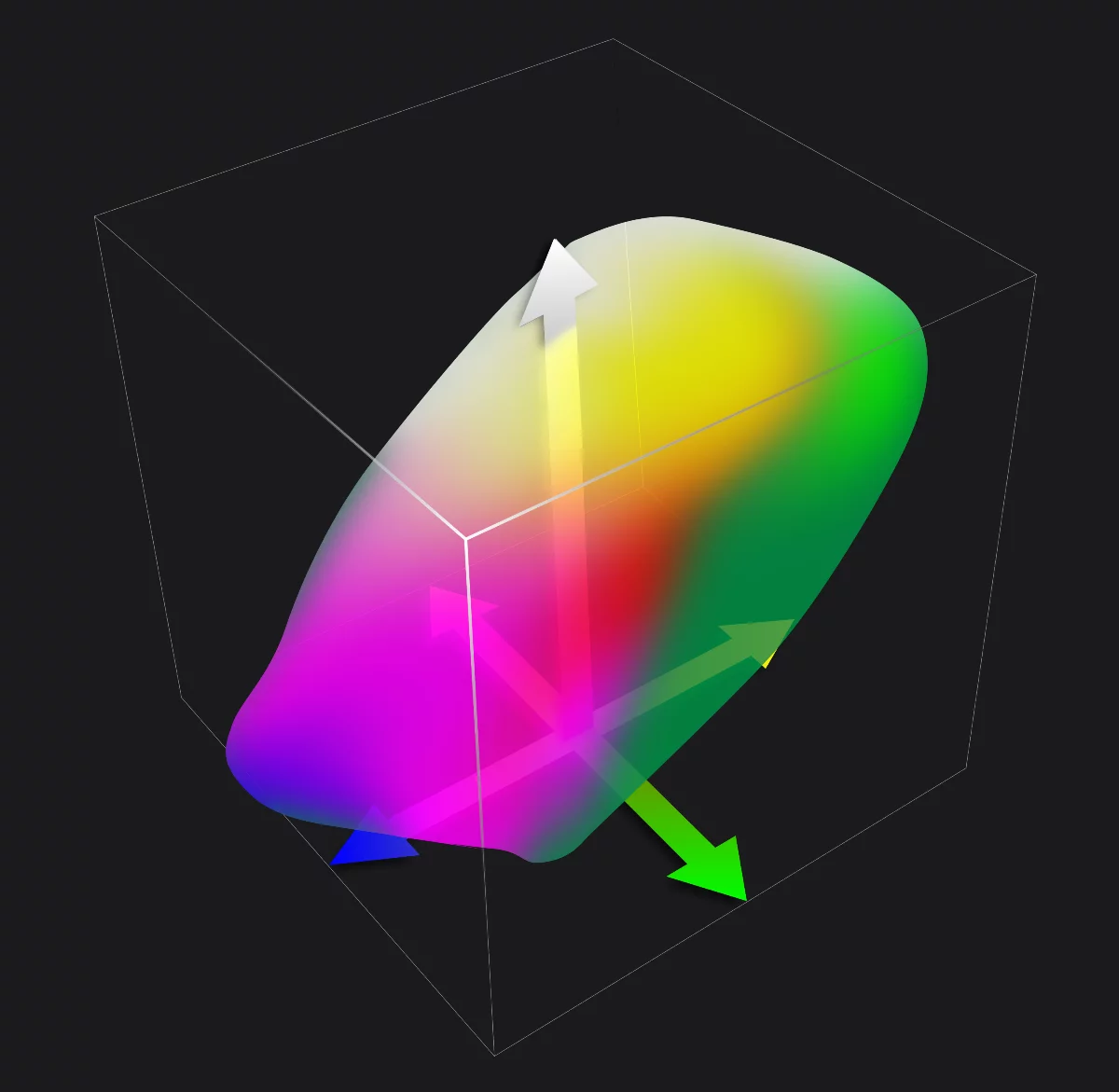
Lab color space is not very popular among digital artists, it is however a precise, device-independent color definition used in science and industry.
In Infinite Painter 7 you can define colors using Lab coordinates (see LAB color sliders).
The axes of the LAB space are actually pretty intuitive color dimensions:
L* = color brightness (black-to-white)
a* = color tint (green-to-red/magenta)
b* = color temperature (blue-to-yellow/orange)
The terms "tint" and "temperature" are commonly used in digital photography and image editing.
CMYK color space
Only for printing.
CMYK color model is the most popular system of coding colors for printing. It is based on covering white paper with inks of four defined colors: Cyan, Magenta, Yellow and blacK.
Note that because this system is based on real, chemical inks used for printing, it is highly device-dependent. This means that CMYK values of given color will be different for different inks used for printing. In turn, the ink standards vary from country to country and even from manufacturer to manufacturer. There is no single standard CMYK color coding; always consult your printing house for correct color profile to be used.
CMYK is a subtractive color model; it means that the inks block light reflected from white paper.
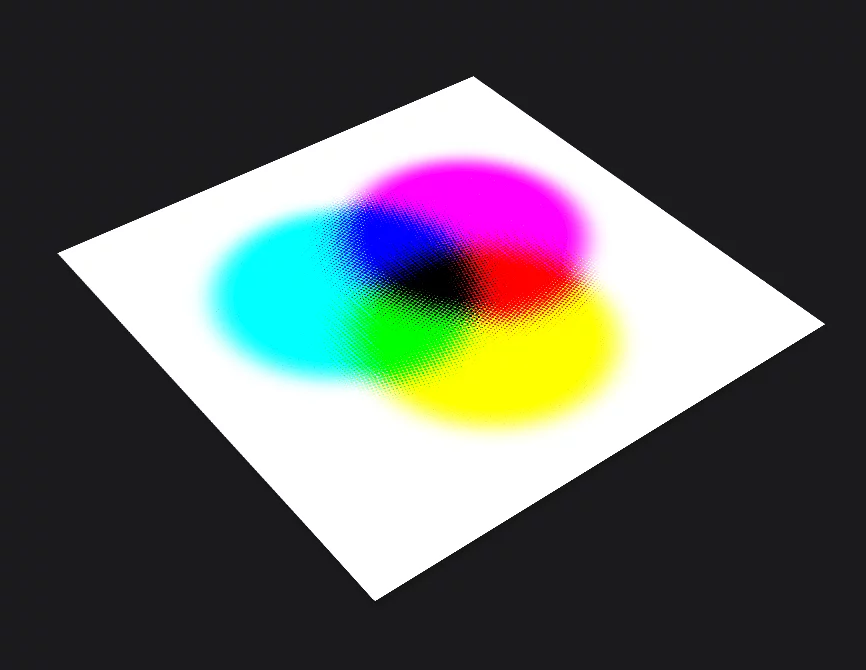
Cyan
Magenta
Yellow
Theoretically by mixing various amounts of CMY inks we can get almost any color. Practically, even with addition of black ink the range of "printable" colors is limited.
White background (paper) is a part of this color model.
CMYK model uses three primary colors (CMY) with addition of black for darker shadows and crisp text printing.
In Infinite Painter 7 you can define RGB colors using CMYK color sliders. See CMYK color sliders for details.
Certain RGB colors cannot be printed in CMYK technology. Learn more about color gamuts in Color gamuts.
RGB image (full RGB gamut) vs. CMYK simulation (printable colors)
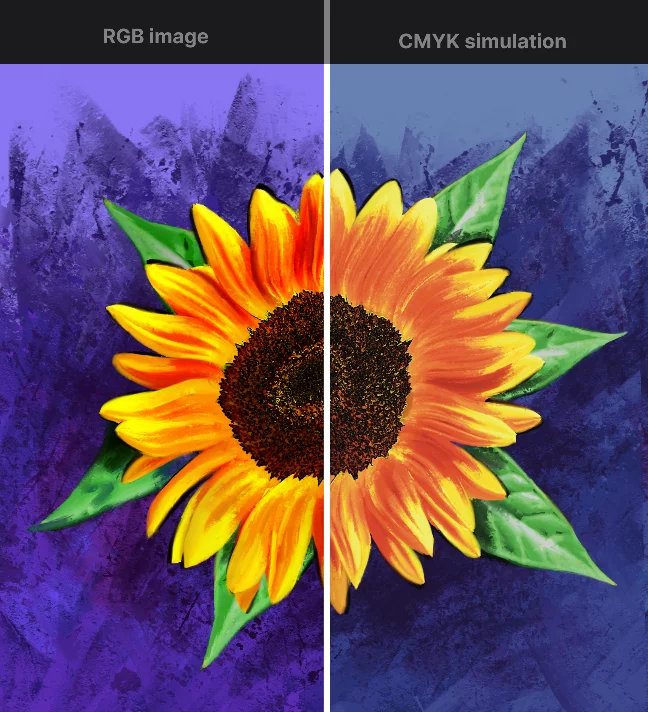
Note that saturated, dark blues, reds and greens usually look dull when printed in CMYK technology.
Infinite Painter 7 offers CMYKCMYKIn digital art and printing, CMYK is a color space based on four inks: Cyan, Magenta, Yellow, and Key (Black). It’s primarily used for color printing, where colors are created by subtracting light from white paper. Unlike RGB (used for screens), CMYK is a subtractive color model, and its color range is more limited than RGB.
Learn more preview function that allows you to assess how your artwork will look like when printed in CMYK.
Note that there is no one, “standard” CMYK color scheme. There are multiple CMYK standards (profiles) related to specific ink sets, specific printing technologies and even to specific printing machines. When using the CMYK preview, you should know exactly which CMYK standard (profile) to use for given printing technology. Learn more in On-screen color proofing.
Any on-screen CMYK preview is only an approximation.
Note that most of contemporary desktop printers and large-format plotters no longer use CMYK color scheme.
Color gamuts
All color models have limitations.
Each practical color reproduction system has limited range of available colors. This range is called "gamut".
It is important to know the limitations of color models used in digital technology.
Comparison of RGB and CMYK color gamuts
on a CIE 1931 xy chromaticity diagram (don't ask; that's just an illustration)
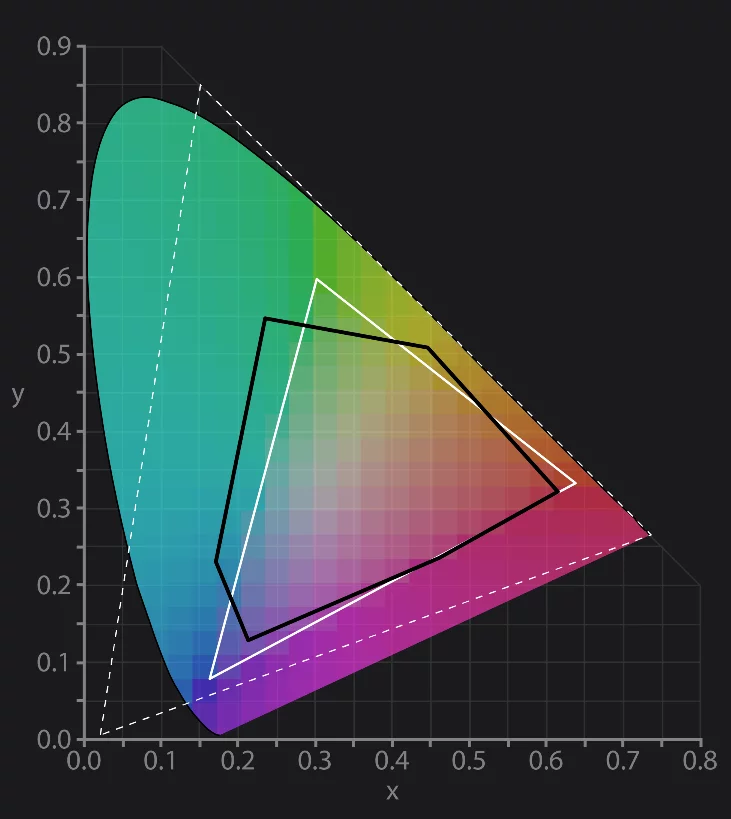
Theoretical range of all possible chromaticies
in the CIE 1931 model. For all practical purposes this reflects the full color spectrum (here of course simulated)
Practically widest RGB gamut (ProPhoto RGB)
Note that most of the computer screens are not able to display this color range.
sRGB gamut
(used in Infinite Painter and in most other computer apps.)
CMYK gamut (example)
Note that blue, green and red areas of sRGB stretch outside the CMYK gamut. These are the "non-printable colors".
In reality different CMYK standards have different gamuts. For example, printing on uncoated paper will further limit the color range.
Diagram based on File:CIE1931xy gamut comparison.svg from Wikimedia Commons
If you intend to print your artwork in CMYK technology you can preview how the RGB image will look like when printed. This allows you to take into account the limited CMYK gamut and alter your artwork if necessary. Learn how to use CMYK preview in Infinite Painter in On-screen color proofing section below.
On-screen color proofing
For professionals.
Infinite Painter 7 allows you to correct displayed colors to simulate limited Color gamutColor gamutThe range of colors possible to code or display in given color model.Learn more like CMYK colors.
Note that this affects the displayed colors only, not the actual pixel colors of your artwork.
Before using color proofing feature make sure you understand the concept and limitations of on-screen color proofing and make sure you know exactly which color profile you should use. Consult your print supplier or refer to online information about using color profiles.
Note that any on-screen color proofing is only an approximation. RGB computer displays are not capable of displaying faithful CMYK simulation, especially non-calibrated screens of mobile devices. Proceed with caution.
Color profile selector
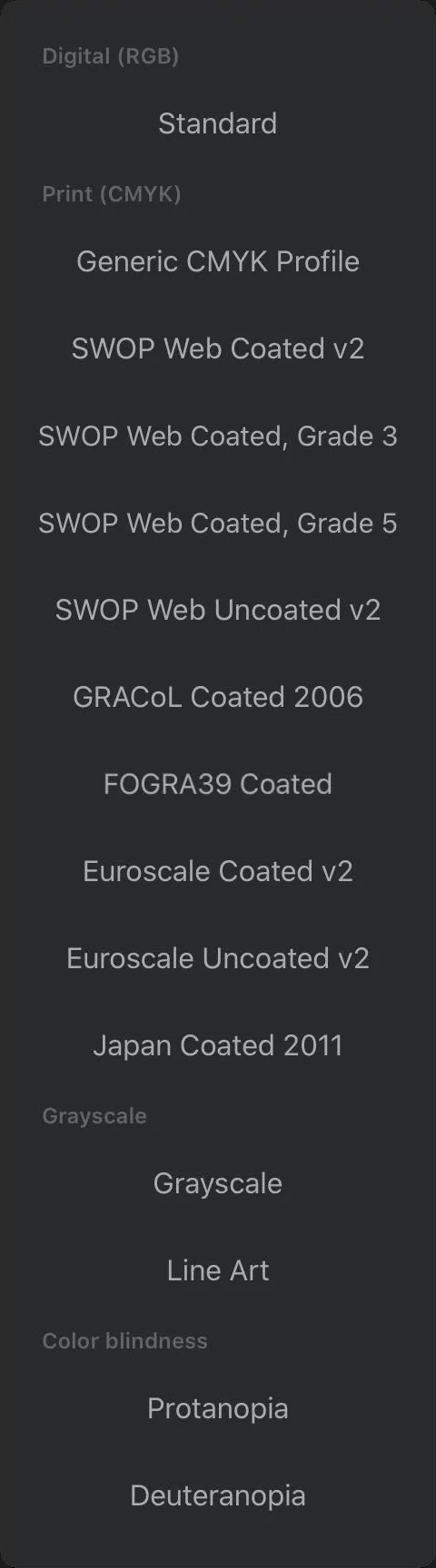
Standard sRGB profile.
Default for all new projects.
CMYK print profiles
Make sure you understand the differences between different standards of CMYK printing and that you know exactly which profile to use. Use "Generic CMYK" profile only as a general reference.
Grayscale
Use to assess tonal values.
Line Art
Turns all layers to Line Art blending Learn more in ”Masking” blending modes and in ”Linea-art” blending mode.
Color blindness profiles
Use as general reference. There are various kinds of color blindness that cannot be simulated with these profiles.
Gamma correction
Improve color mixing.
Infinite Painter offers an improvement in mixing of non-opaque colors. The gamma correction reduces increased contrast on overlapping semi-transparent colors.
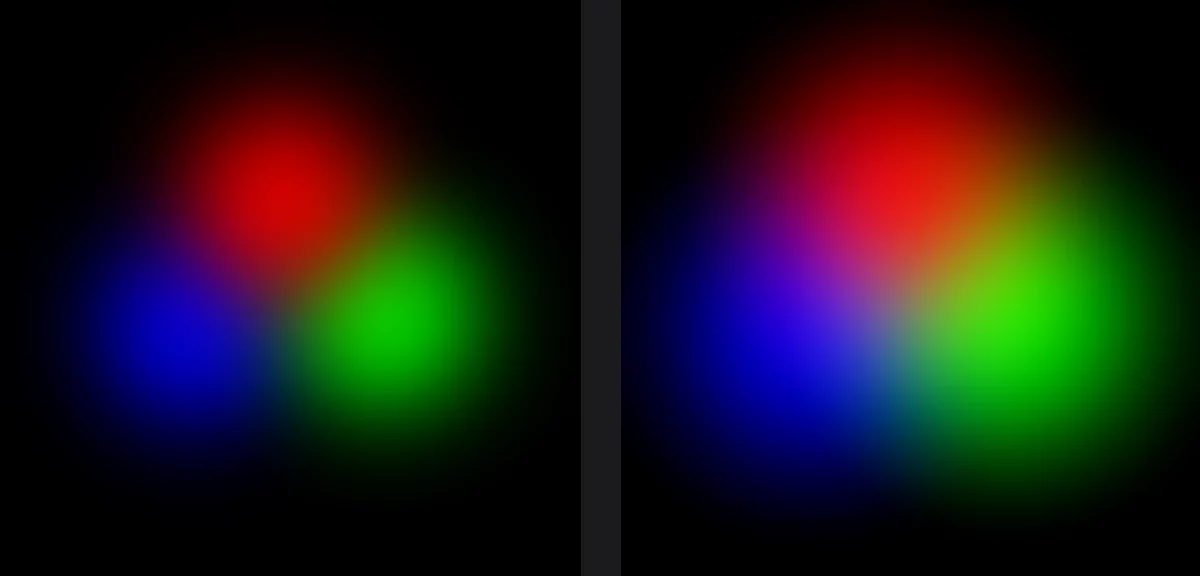
Without Gamma correction
Unnatural mixing of primary RGB colors
With Gamma correction
More natural mixing of primary RGB colors (simulating mixing of three colored light sources)
Note that the gamma correction changes the apparent size of semi-opaque layers; both images are actually identical in size.
Practical example
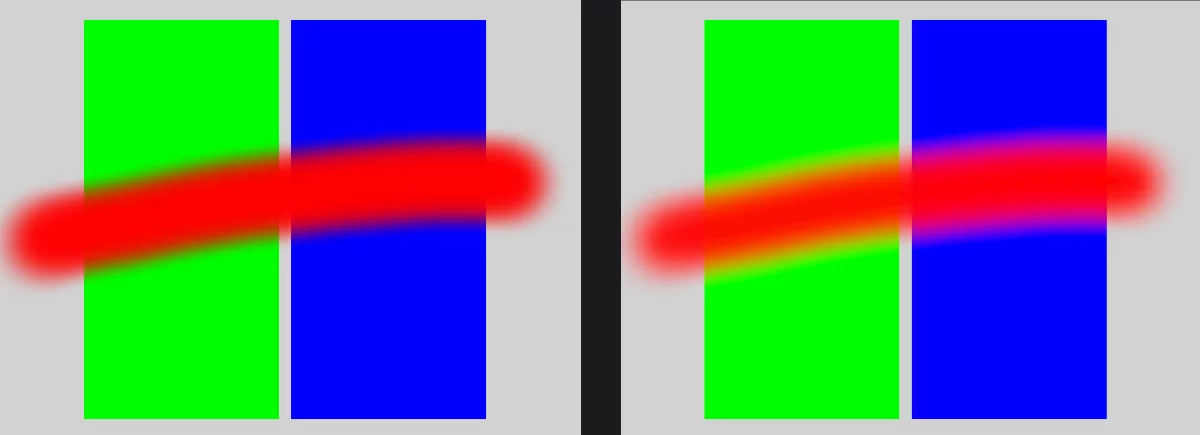
Visible dark area where opposing RGB colors overlap
Corrected color blending
You can turn on Gamma correction from the Layers panel or from the Settings.
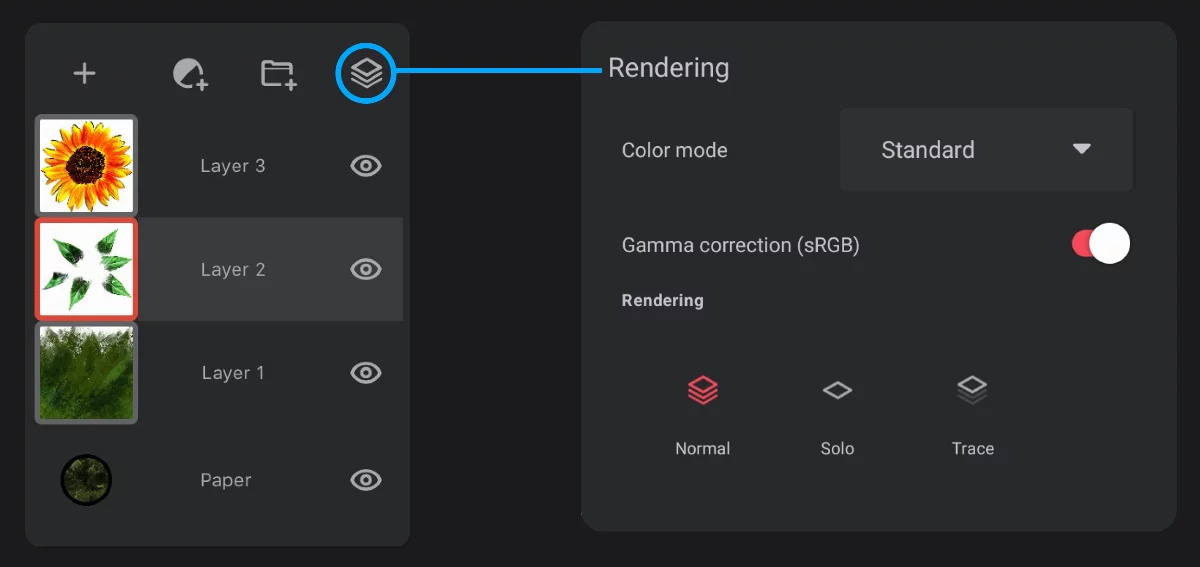
Gamma correction switch
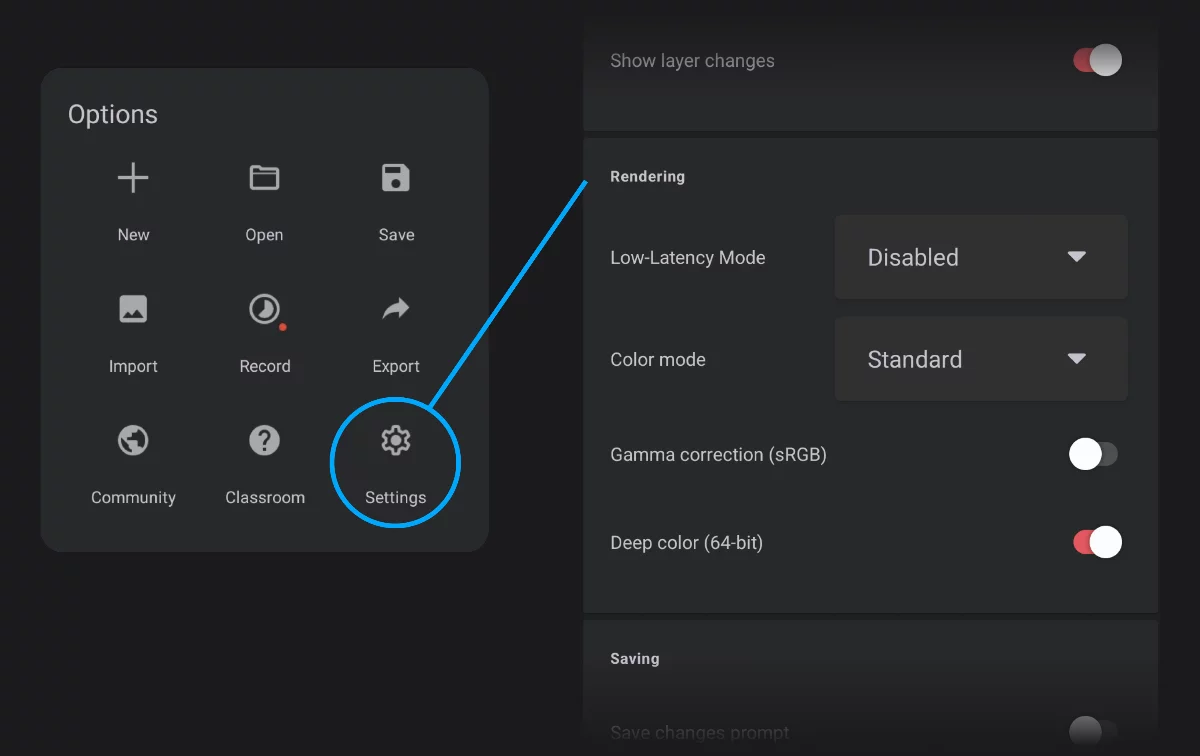
Gamma correction switch
Gamma correction is applied to soft-edged brush strokes, to mixing layers, to non-opaque gradients and filters. In cases, it may produce artifacts, like color banding. You can turn off this option at any time to assess results.
Note that this correction may affect appearance of projects created without it.
Using Gamma correction along with the on-screen color proofing may give unpredictable results. Learn more about color proofing in On-screen color proofing.

You may want to turn off Gamma correction to achieve color mixing consistent with other painting applications that don't have this functionality.
64-bit color depth
Super nerd stuff.
Infinite Painter uses 64-bit color depth internally. This means instead of 256 colors per RGB channel it uses 65.536.
Regular 32-bit color:

RGB (3 x 8 bits = 24 bits) plus alpha channel (transparency channel, also 8 bits) = 32 bits per pixel; May show banding on a long gradient *
(* gradient banding shown here is a simulation; your screen actually doesn't support 64 bit color depth.)
64-bit color:

RGB (3 x 16 bits = 48 bits) plus alpha channel (transparency channel, also 16 bits) = 64 bits per pixel; = Smooth gradient.
While standard 32-bit coding (24-bit RGB color plus transparency) gives 16.7 million possible colors, 64-bit color coding allows for 281 trillion colors (2.8 × 10^14). Plus over 65,000 levels of transparency for each pixel that's 1.8 × 10^19 combinations altogether; don't ask.
64-bit color allows for far more precise calculations and in result:
• smoother gradients
• smoother brush strokes
• safer image editing