
Built-in brush collection
A lot of them.
Infinite Painter 7 comes with a huge collection of high-quality brushes (currently 168). You can use them, modify them, make copies — and of course you can add more. Built-in brushes are organized in 16 folders (categories). You may sort them in other ways if you wish so. (Learn how to organize your brushes in Brush management).
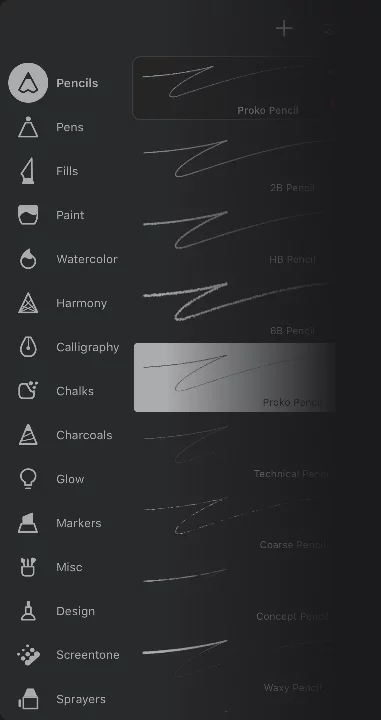
You can reshuffle the brush folders, hide those folders you don't need at the moment and add custom folders. More in Brush management.

Pencils
10 realistic pencils and 4 shaders.

Pens
20 different precise pens and nibs.

Calligraphy
8 elegant calligraphic nibs.

Markers
10 markers and marker blenders.

Paint
26 brushes for oil-colors, acrylics and gouache.

Watercolor
9 brushes with realistic Watercolor effects.

Sprayers
12 airbrushes, splatters and sprayers.

Chalks
7 chalks and pastels.

Charcoals
7 charcoal blocks.

Design
6 pens with dotted/dashed lines and arrows.

Fills
6 different fill textures. Solid fill brush fill here as well.

Glow
10 special effect brushes for light and fire effects.

Misc
13 miscellaneous brushes. 3D effects and more.

Screentone
7 raster-texture brushes not only for Manga.

Textures
8 brush textures for special tasks.

Harmony
9 special brushes based on algorithms (not fully editable).
Restoring deleted built-in brushes
You can have them all again.
You can restore any accidentally deleted built-in brush. But you do that folder-by-folder.
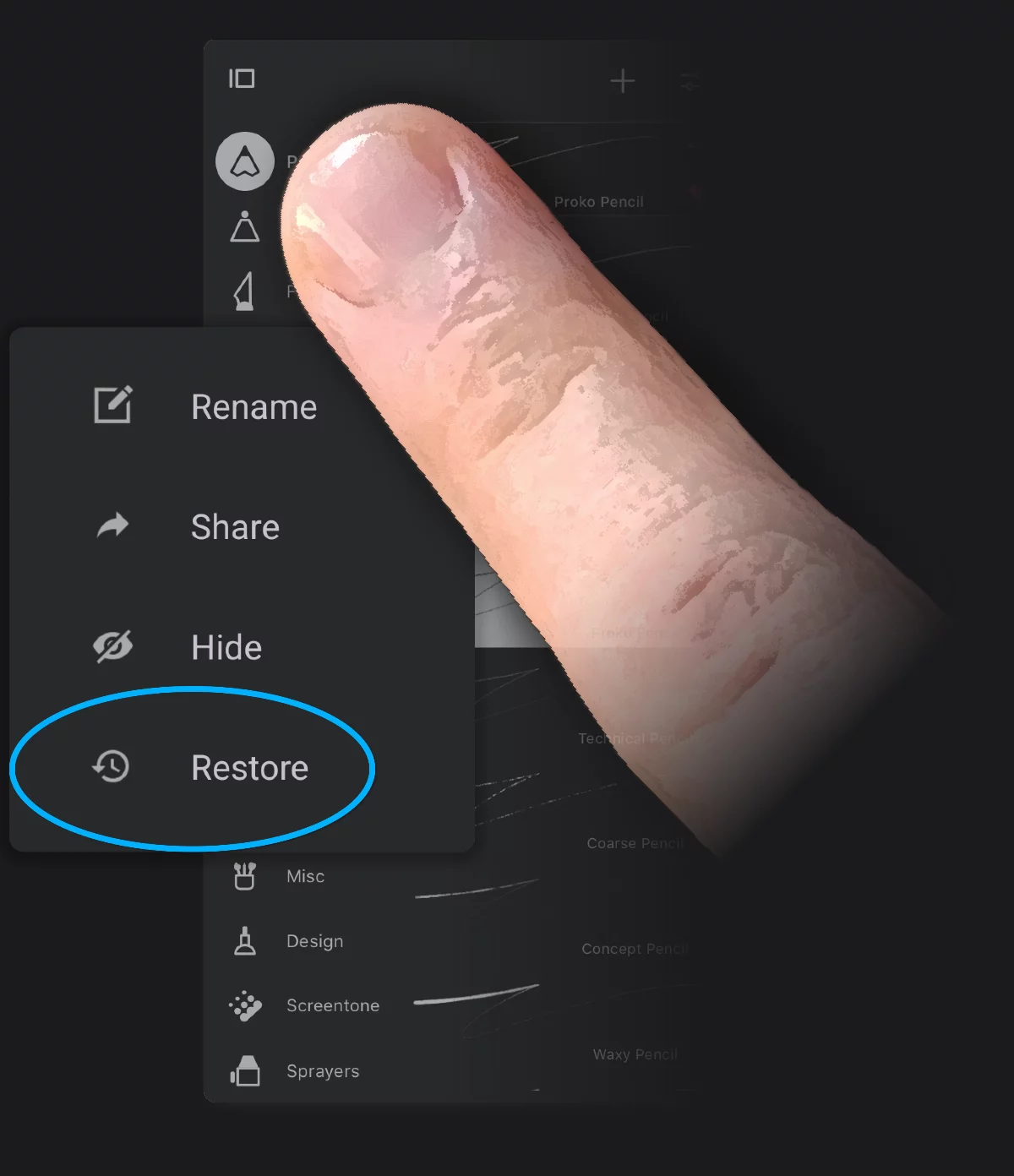
Long-press on the brush folder icon to display the pop-up context menu.

Then tap the "Restore" command. All built-in brushes from this folder will be restored.

If you have also hidden one of the default brush folders you can restore it with the button on the top of the brush selector panel. (This icon appears only when a folder has been hidden).
List of built-in brushes
All of them.
[Special effects shown in brackets].
Learn more about using special effects in brushes in Brush editing.
Learn more about the special, procedural brushes (Harmony and Fill) in Procedural brushes.
Pencils
2B Pencil
HB Pencil
6B Pencil
Proko Pencil
Technical Pencil
Coarse Pencil
Concept Pencil
Waxy Pencil
Old Pencil
Cloth Shader
Fiber Shader
Hatching
Cross Shader [screentone]
Scratch Shader
Pens
Solid Pen
Soft Pen
Fine Tip Pen
Manga Inker
Tapered Inker
Old Inker
Coarse Inker
Dry Inker
Leaky Pen
Pilot Pen [particle]
Gel Pen
Velocity Pen [particle]
Fountain Pen
Fineliner
Signature Pen
Slanted Inker
Torn Ink
Ink Wash [watercolor]
Velocity Inker [watercolor]
Pixel Pen
Calligraphy
Monoline
Oval Lettering
Soft Taper
Floral Pistil
Chalk Signage
Split Nib
Raised Edge
Right Slant
Markers
Dry Ink Marker
Chisel Tip Marker
Broad Marker
Glazed Marker
Wet Marker
Colorless Blender
Sketch Marker
Round Marker
Brush Marker
Highlighter
Paint
Paint Stroke
Thick Angular
Clay Roller
Dry Brush
Dry Ink
Filbert
Flat Oil
Glazed Acrylic
Gouache
Indian Ink [watercolor]
Loaded Knife
Old Glazed
Old Gouache
Old Oil
Old Vanish
Paint Roller
Palette Knife
Streaky Oil
Stucco Roller
Thick Filbert
Thick Oil
Thick Rake
Thin Hairs
Velocity Splatter [particle]
Wet Gouache
Wet Stucco Roller
Watercolor
Wet Paper
Light Wash [watercolor]
Heavy Wash [watercolor]
Heavy Bleed [watercolor]
Mostly Water [watercolor]
Chemical Burn [watercolor]
Salt Blossom [watercolor]
Circle Stains [watercolor]
Floral Stencil [watercolor]
Sprayers
Blood Splatter [watercolor]
Flecks
Circle Drip
Sand Blaster
Water Splatter
Splatter [particle]
Cloudy
Spray Paint
Soft Airbrush
Medium Airbrush
Hard Airbrush
Hard Round
Chalks
Chalk
Cracked Chalk
Chalk Shader
Schoolhouse Chalk
Round Pastel
Square Pastel
Wet Pastel
Charcoals
Gesture Vine
Charcoal Pencil
Soft Charcoal
Hard Charcoal
Charcoal Stick
Coarse Charcoal
Willow
Design
Cut Out
Long Dashes
Doodle Dots
Flow Arrow
Arrows
Arrow Chain
Fills
Solid Fill
Screentone Fill
Debris Fill
Grunge Fill
Scratch Fill
Checker Fill
Glow
Light Pen
Neon Pen
Sparkler [particle]
Soft Glow
Bokeh
Scene Glow
Combustion
Flame Ribbon
Light Hairs
Stardust [particle]
Misc
Twisty 3D
Tube 3D
Ribbon 3D
Newspaper Transfer
Scribble Scrabble
Dry Sponge
Kitchen Sponge
Natural Sponge
Smoke
Outliner
Savory
Roses
Stars
Screentone
Dash 45 [screentone]
Denimite [screentone]
Dot 45 [screentone]
Halftone [screentone]
Tone Shader
V Lines
H Lines
Textures
Backsplash
Bricks
Cordaroy
Glazed Compound
Pebbles
Wood
Isometric Grid
Standard Grid
Harmony
Sketchy [harmony]
Shaded [harmony]
LongFur [harmony]
ShortFur [harmony]
Ribbons [harmony]
Curvy [harmony]
Grid [harmony]
Circles [harmony]
Squares [harmony]