About

Projects

Home workspace

Studio workspace

Brushes

Color

Layers

Text

Fill tools

Guides

Shape tools

Cloning

Symmetry

Perspective grids

View tools

Selections

Transformations

Color Adjustments

Filters

Liquify

Pattern tools

Canvas tools

Import - export

Technical stuff

Rewind function

icon/liquify_rewind

Liquify — Rewind function

In case you overdid something.

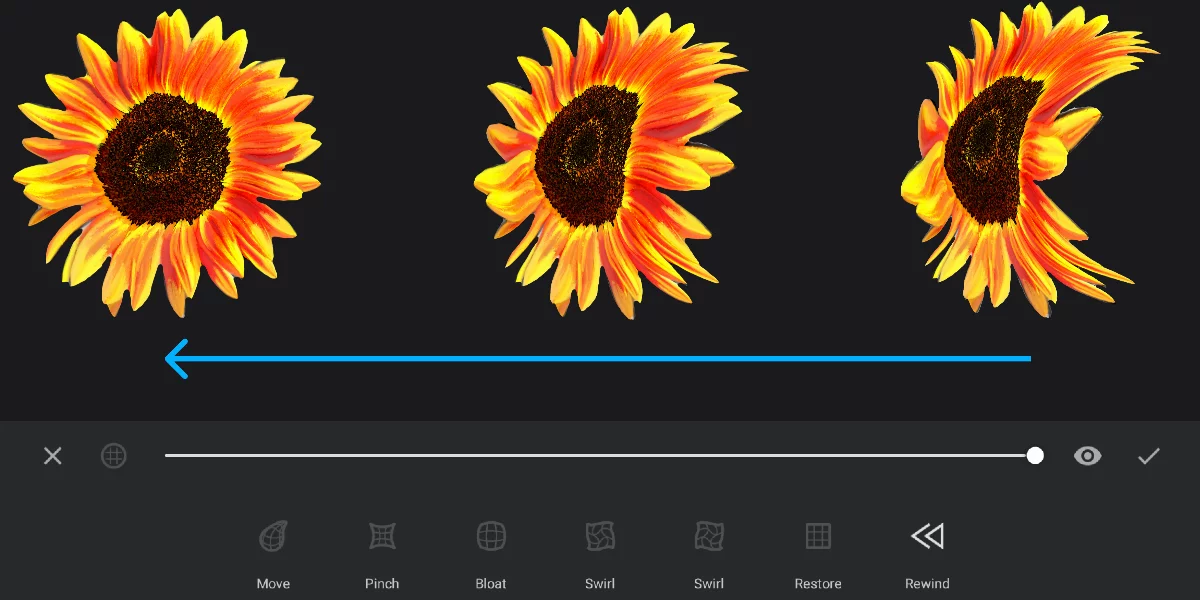
The Rewind function lets you soften the deformation applied to the artwork with the Liquify tools.

It is however not the undo history; it reverses the deformations globally.

1
3
2
1

The grid completely smoothened (zero deformation)

2

An intermediate state (less deformation)

3

Current state of deformation (image deformed with any Liquify tools).


Note that in the Rewind mode the slider does not control the size of the tool. The slider adjusts the amount of smoothing of the grid.

The Rewind affects only the deformations applied in the current session of Liquify. After each session the grid is reset.